
Sid Meier's Civilization VII
Player Toolkit
Shape your single-player campaign with convenient tools for resources, research, leaders, settlements, and units. Open the in-game panel to move past a setback or try a new strategy.
Player guide View release notes
Make it your own
What it brings to your game
Resources and research boosts
Settlement and commander tools
Map exploration and movement controls
Player guide
Make the most of your mod
Requirements
For Civilization VII single-player games, including existing campaigns. Player Toolkit is unavailable in multiplayer and hot-seat sessions.
Actions apply only to your civilization and your own units, commanders, and settlements. They take effect immediately and are saved with the campaign, so make a manual save first if you may want to undo a choice.
Installation
- Subscribe on Steam or extract the Nexus archive.
- For a manual installation, place the complete WPS_CivVII_PlayerToolkit folder in %LOCALAPPDATA%\Firaxis Games\Sid Meier's Civilization VII\Mods. Do not place its loose contents directly in Mods.
- Restart Civilization VII, enable WPS Player Toolkit in the Mods menu if needed, and start or load a single-player campaign.
Open the toolkit
- Select the population/person button in the upper-right system bar.
- Choose the action you want.
- For unit, commander, or settlement actions, select one you own on the map first.
Available tools
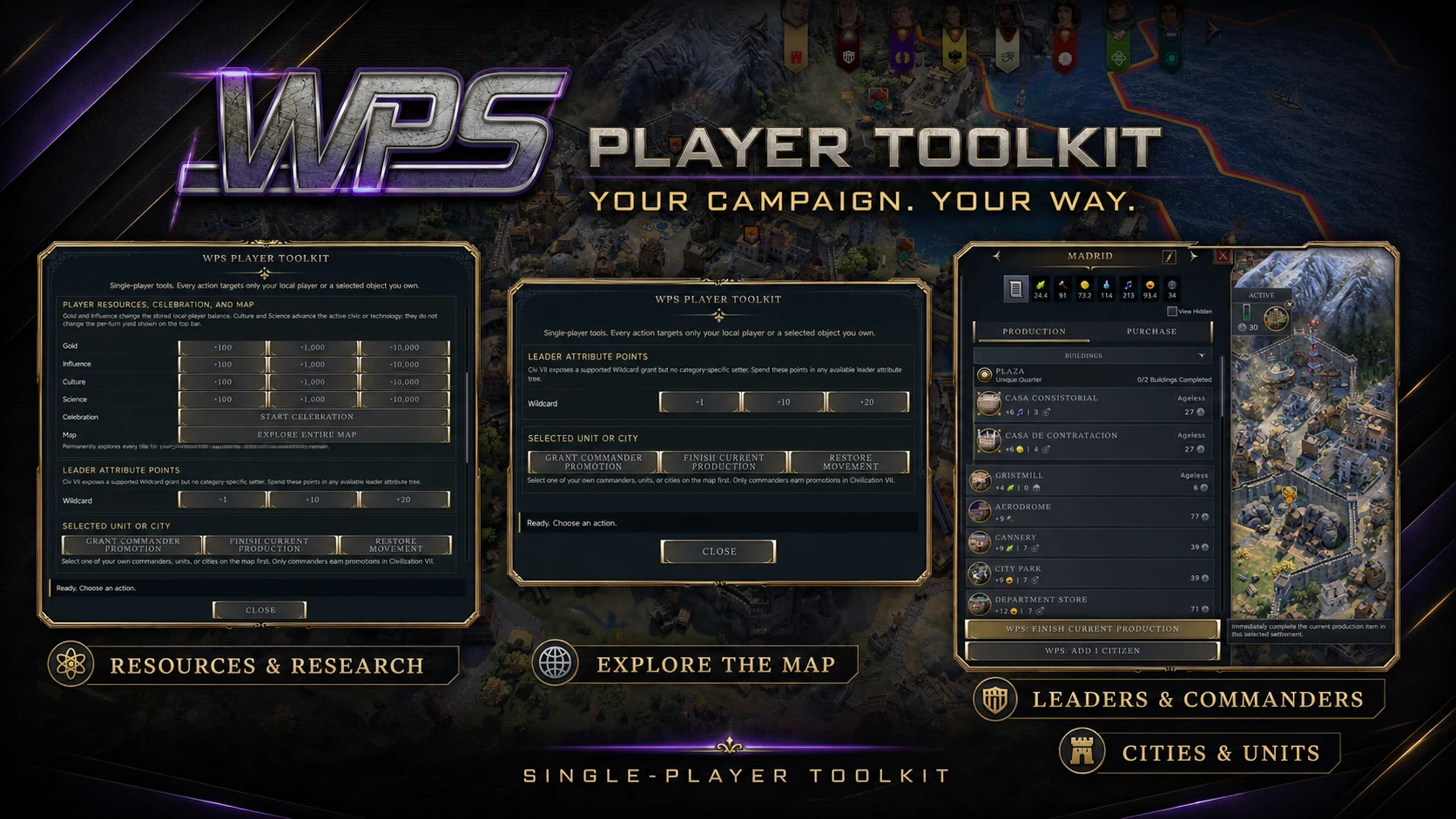
- Add 100, 1,000, or 10,000 Gold or Influence, or apply those amounts of Culture or Science to your active civic or technology.
- Start a Celebration immediately.
- Explore every map tile while retaining normal fog of war and live-unit visibility. Exploration can trigger normal discoveries and first contact.
- Add 1, 10, or 20 leader Wildcard points to spend in an available attribute tree.
- Give the selected commander enough experience for one more promotion, then choose the promotion yourself.
- Finish the selected settlement’s current production from the main toolkit or its production screen.
- Add a citizen from the settlement’s production screen, then place the citizen on a rural tile or Specialist slot normally.
- Restore the selected unit’s movement. This does not restore its ability to attack.
If an action is unavailable
Check that you are in a single-player campaign and have selected a unit, commander, or settlement belonging to your civilization. Open the settlement’s production screen for Add 1 Citizen.
A closer look
Gallery
The latest, and what came before
Release notes
Version 0.1.7Nexus Mods
- Initial public release.
UpdateAugust 3, 2026Steam Workshop
- First public release of WPS Player Toolkit.